
January 2025

Microsoft 365 Training
Enhance your skills with our upcoming Microsoft 365 training series, designed specifically for the DTCC community! DTCC is pleased to offer several sessions in the upcoming months to assist you with learning to use Microsoft 365 products effectively. Gain valuable skills in Outlook to master email and calendar management, explore OneDrive to streamline your file storage and sharing, and dive into Teams to enhance collaboration and communication. These courses will empower you with the tools you need to succeed. Our hands-on training ensures you’ll leave confident and ready to tackle any digital challenge. Training sessions will be offered through February 2024. Register on the DTCC Microsoft 365 Training page for sessions and join us as your schedule permits.

Lumi Chat
Have you ever noticed the chat button in the bottom right corner of your Brightspace screen? That’s Lumi Chat, formerly known as Brightspace Virtual Assistance. Lumi Chat now uses generative AI to answer questions about D2L’s Brightspace (including DTCC-specific questions) and to enhance the user experience. Simply click to open, and ask a question. Lumi will interpret user queries, identify intent, and generate a detailed answer using information from D2L’s knowledge bases. These responses also include links to relevant documentation, ensuring users have access to comprehensive resources. In December 2024, Lumi Chat began to deploy customer satisfaction surveys to gather feedback on user experiences. The survey will automatically open when you close your Lumi chat window but can be accessed anytime using the star icon in the upper right corner of the chat.

Take the Accessibility Challenge
Do you like a challenge? Do you want to make sure that all students have access to your course materials? If you answered yes, consider participating in the accessibility challenge. Our upcoming newsletters will provide more details about the challenge which focuses on making sure your courses are accessible for all students. Come join in on the fun while supporting student success for all students. Reach out to Dr Laura L Thompson (LThomps8@dtcc.edu) or Amanda Hooper Alcaraz (AHooper@dtcc.edu) and with any questions and to share your journey through the challenge.
Why is Accessibility Important?
To prepare for this challenge, you might like to watch this TED Talk. In her TEDxMIT talk, Creating an Accessible Digital Future, Judy Brewer highlights the critical need for designing digital tools and environments accessible to all, emphasizing universal design principles and the benefits of inclusive innovation.
Direct Link: Creating an Accessible Digital Future Video
1st Challenge – Documents
For this first challenge, we propose that you focus on documents that you create for use in your classes.
Resources
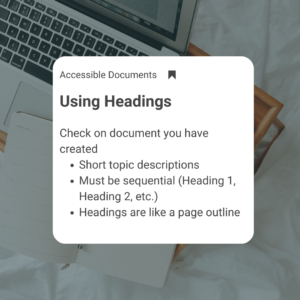
To learn more about creating accessible documents, check out these resources.
- Video: Improve accessibility with heading styles
- Microsoft Word – Creating Accessible Documents
- Using Headings in Google Docs
CCIT wants to support you in creating accessible content. We invite you to check out our Instruction, Design & Technology (IDT) course, G19: Creating Accessible Content, that will be offered during the first 7-weeks of Spring 2025! Learn more about our IDT Certificate Program and course offerings on our website. You can also check out our Digital Accessibility MCC.

Join CCIT for this month's learning opportunities:

Lunch and Learn
Every Tuesday at 11 am on Zoom
We have exciting sessions in store for the Spring semester. We will start the new year with a Spring Kick-off event with session offerings throughout the day. We look forward to seeing everyone recharged in January!
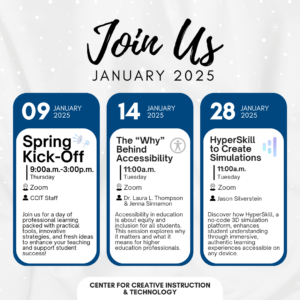
You can find out even more about these offerings and view past Lunch and Learn sessions by clicking the button below to visit our Lunch and Learn webpage. The page also includes an accessible version of all the information for upcoming Lunch and Learn sessions.

ThingLink Scenario Builder Upgrade
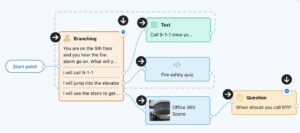
ThingLink has released a powerful upgrade to its Scenario Builder tool, Scenario Builder 2.0. With enhanced AI features and significant improvements, Scenario Builder 2.0 offers a streamlined experience for creating dynamic and immersive learning materials, such as guided lessons, trainings, virtual tours, virtual escape rooms, and more. Key improvements include an upgraded editor, new question and branching blocks for personalized learning paths, and an AI tool that transforms your uploaded files into robust scenarios.
The original Scenario Builder (version 1.0) editor will remain available until January 2025 and then you will have to transition your scenarios to 2.0. Converting your existing scenarios to version 2.0 will create a copy of the original version that will remain unaffected and continue to function as usual, but will allow you to edit your existing scenarios and take full advantage of the new capabilities.
To learn how to convert your scenarios and explore the possibilities of Scenario Builder 2.0, check out ThingLink’s step-by-step guide.

New Roles in D2L
This is an important update if you are a Course Lead, Department Chair, or Instructional Coordinator who oversees DEV course access. Previously, identifying who had access to a DEV course was challenging, but now the Class List displays two new roles, offering clarity.
- DEV Course Builder: Can edit course content.
- DEV Observer: Can view and copy the course but cannot modify its content.
These changes make it easier to manage course access and ensure appropriate permissions.
These roles help make managing access to DEV courses easier. For more information, check out the Department Chair Reference Guide