
Help PDFs play well with
D2L’s Document Reader
By now, you’ve probably tried using ReadSpeaker in your D2L courses. It works great with HTML pages! But, what about documents you have uploaded into your course? For these, there is Document Reader! The Document Reader helps students by reading aloud the content in documents such as Word docs or PDFs. The only problem is, what if that PDF is a scan of another document? Well, document reader will have a hard time finding the text on that page!
Ally’s File Transformer is here to help! Watch how quickly you can go from an unreadable PDF to a PDF read aloud right in your D2L shell. Follow these steps to check and update your files in less than 5 minutes!

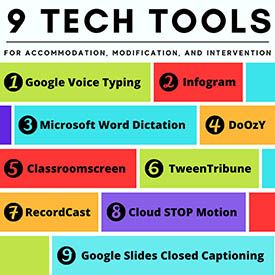
Technology Tools for Accommodation, Modification, and Intervention
Accessibility is a top priority for us! We were able to purchase ReadSpeaker, a text-to-speech tool that is integrated into D2L. Showing students this audio option will create more opportunities to engage students and accommodate the various ways students absorb content.
Curious about some other tools available to accommodate students?

D2L Learning Center and Guided Trainings:

Wish there was a way to learn more about using D2L? Find yourself frustrated with tools that you haven’t quite mastered? The D2L Learning Center was created to ensure you learn and grow your D2L skills so you feel lost no longer! This guided training is consistently updated and covers all levels of experience.
To get started, you need to be a member of the D2L Brightspace Community. If you haven’t signed up yet, that’s your first step. Make sure you use your dtcc email address to access all of the content! Then you’ll jump into the Learning Center where you can learn at your own pace. Don’t forget to share your new skills with your colleagues!

December Coffee Talks
 We have one last Coffee Talk left for 2021!
Don’t miss it!
December 3: Interactive Google Slides
and TEaCH Champions
Join us with Zoom:
https://dtcc.zoom.us/j/93627251230
December Lunch and Learn
Mark your calendar for December Lunch and Learns.
Wednesdays at 11:00 am
 December 1st: Creating Interactives
with Al
December 8th: Basic Microsoft Teams
with Adrian
Join us with Zoom:
dtcc.zoom.us/j/9431031182
Teams Support Trainings
 Transitioning from Skype to Teams for video meetings and chats? It is easier than you think. Attend one of these professional development offerings to find out how.
- Dec 15 @ 10:00 am
- Dec 16 @ 2:00 pm
- Dec 17 @ 10:00 am
Zoom Link: dtcc.zoom.us/j/94970196056

Zoom Updates
Zoom has added a few features
for you to try in your courses!

Profile Photos and Emojis in chat: The In-meeting chat now displays the participants’ profile photo when they type a message. If no image is available for a participant, their initials appear. You can also now use emojis in the chat as well.

Co-hosts can now control Breakout Rooms and Polls: If meeting hosts add alternative hosts to their meeting, they can allow alternative hosts to add or edit polls & create breakout rooms. The alternative host in the meeting will also have these additional in-meeting options.

Polling Enhancements for Quizzing: This allows meeting hosts to build advanced polls or quizzes that contain multiple question/answer types, allow for images, and automatically record answers. New question/answer types include match combinations, rank answers, and fill in the blank. Find more about it out here:

Focus Mode: In Focus Mode, only the host can see participants’ videos and profile pictures. You can start Focus Mode from the “More” menu on the toolbar of the desktop client. This setting is available at the account, group, or user level setting. To use Focus Mode, you must have desktop client version 5.7.3 or higher for Windows or macOS. Find more about it out here:
